










Companies that choose us



















What POSfix handles
Start with what you need today and add the rest when you need it
- Sales & paymentsOnline cash register, card and QR payments, online shop
- Accounting & financeAccounting software, e-Factura, banks, tax returns
- Stock & productionInventory management, production, invoice recognition
- CustomersCRM and loyalty, company profile
- Dashboard & teamPersonal dashboard, payroll
- IntegrationsAPI and webhooks, Telegram, Nova Post
What you do in one module reaches the others on its own
There are many good products on the market. If you buy one for each need, you are left connecting them and moving data between them. In POSfix, sales reach stock and accounting on their own, and products and customers are the same in every module.
Accounting software
Online accounting software for companies in Moldova
POSfix keeps your books under SNC: journal entries, trial balance, VAT, payroll and SFS returns. Accountants work in the browser, and till sales go straight into the books.
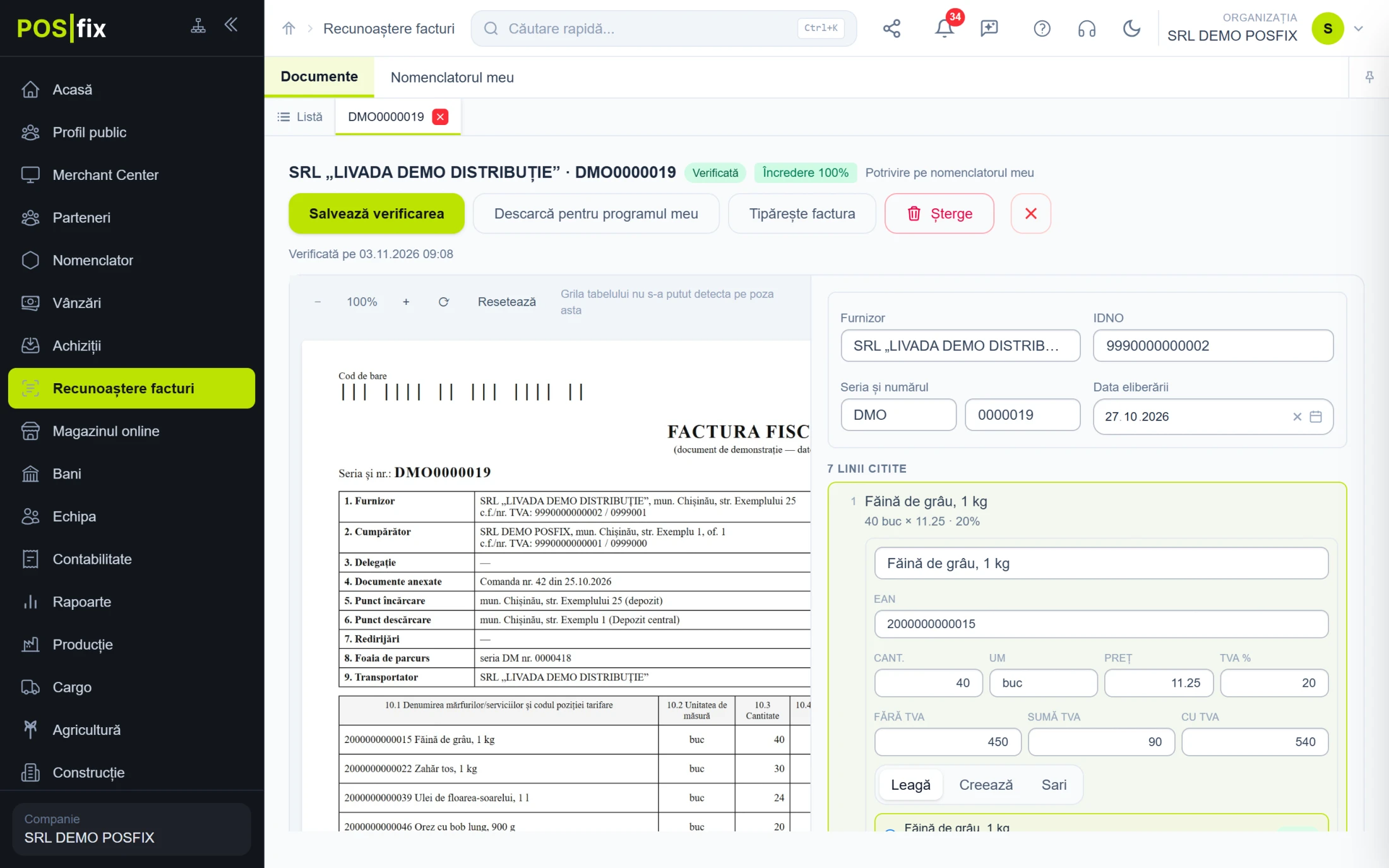
A received e-Factura becomes a purchase invoice with one button. Other invoices you upload in a batch, and recognition fills them in. Sales arrive from the till on Z reports.
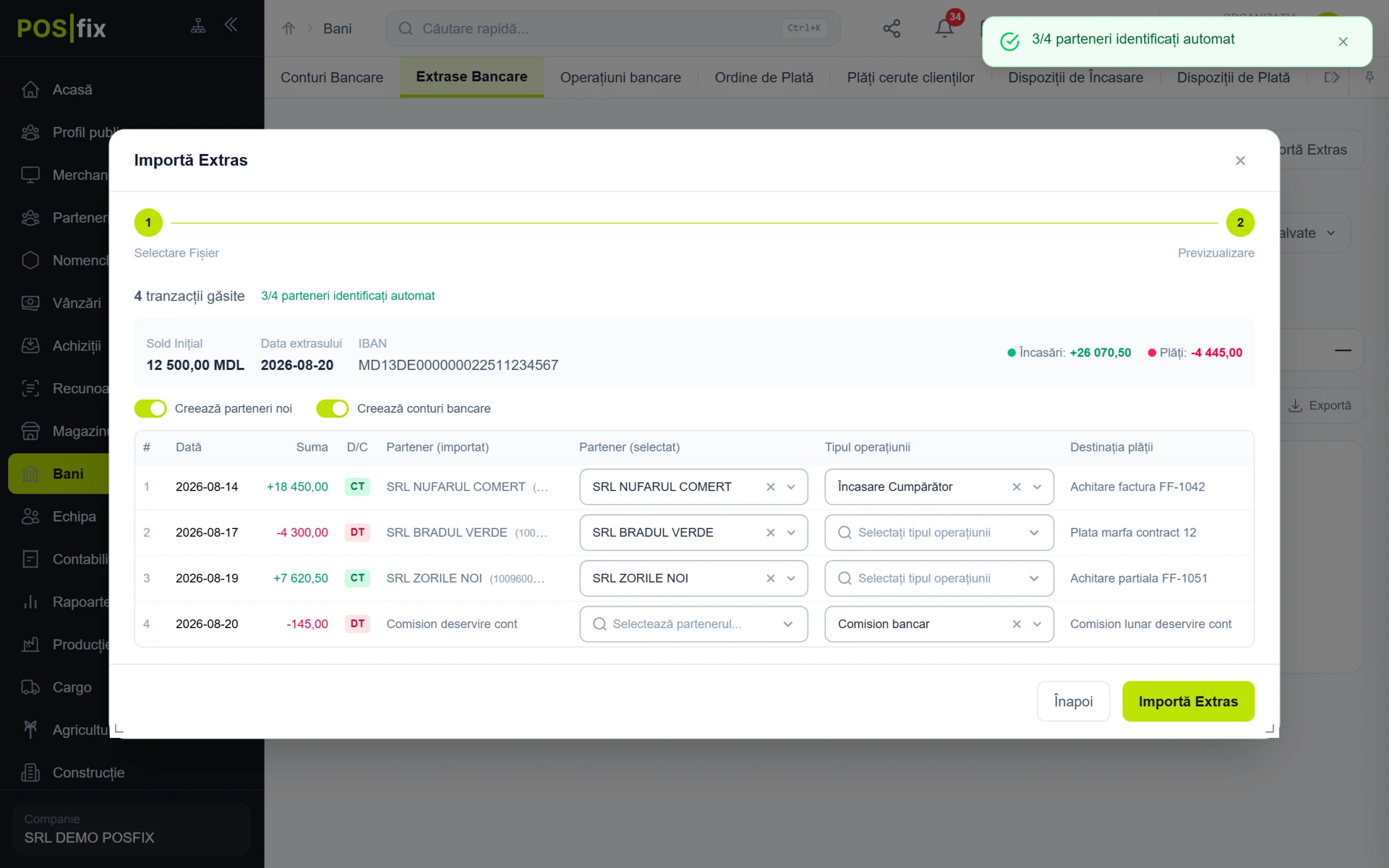
Upload the statement and transactions appear as drafts, with the partner matched by fiscal code. Receipts settle invoices starting from the oldest. You only fix what was not recognised.
We update the CAS, AOAM and income tax rates and exemptions when the law changes, and an old month recalculated stays on its own rates. The calculation tracks when income passes the personal exemption ceiling. Tax depreciation sits next to SNC depreciation on the same row.
Before closing you see the currency revaluation entries, depreciation and the allocation of overheads. You confirm once and they run in order. The month will not close while draft entries remain.
The integrity check shows posted documents without an entry, entries left without a document, negative balances and settlements without a payment. The trial balance expands by analytics and exports to Excel.
The balance sheet and profit and loss statement come out on the official forms. TVA12, IPC21, IALS, IRV14, INR14 and ISAPTI have an XML file, validated before download. Boxes left empty you complete on the form.
Moldovan SNC chart of accounts
The chart comes configured. Add or change accounts to suit the company.
You decide the account
The program fills in the account and you can change it on the document. The entry uses yours.
Check any amount
From the General Ledger you open the document that generated the entry.
Changed a setting?
Repost the documents, and stock, cost and entries are rebuilt.
Moving to POSfix from 1C
Import opening balances directly from the 1C export.
Accountant for several companies?
Log in with one account and switch company from the menu.


POSfix cash register
The cash register on your phone
Install the app on your phone or tablet, add products to the cart and take payment. We set up fiscalisation together.
See the cash register (ECC) registration decision



Control panel
Your business runs, even when you are somewhere else.
Cash, card or MIA QR code, on the same receipt. With softpos, the customer taps their card on the till terminal, with no separate device. The fiscal receipt is issued once the payment goes through.
Invite colleagues by email and give each one a role: manager, accountant, cashier or employee. Everyone sees only what you allow. The timesheet fills in from the work schedule, and salaries are calculated from it.
The cashier finds the customer by phone or card, and the discount and bonus in lei go straight onto the receipt. The loyalty card lives in Google Wallet or Apple Wallet, and Telegram messages arrive in the panel next to the customer's purchases.
The statement comes straight from the bank, or you upload it from a file. Payments find their partner and settle invoices. You see who owes you and whom you owe, and you prepare payment orders in the panel and sign them in your bank's app.
The online store, Nova Post deliveries and e-Factura work with the same products, prices and stock. Your ERP or app reads and writes the catalog, orders and sales through the API.
For your business
Every business has its own way of working.
 HoReCaTables, kitchen and recipes, linked to the till
 ShopsStock goes down with every sale
 BeautyServices and products on one receipt, with loyalty
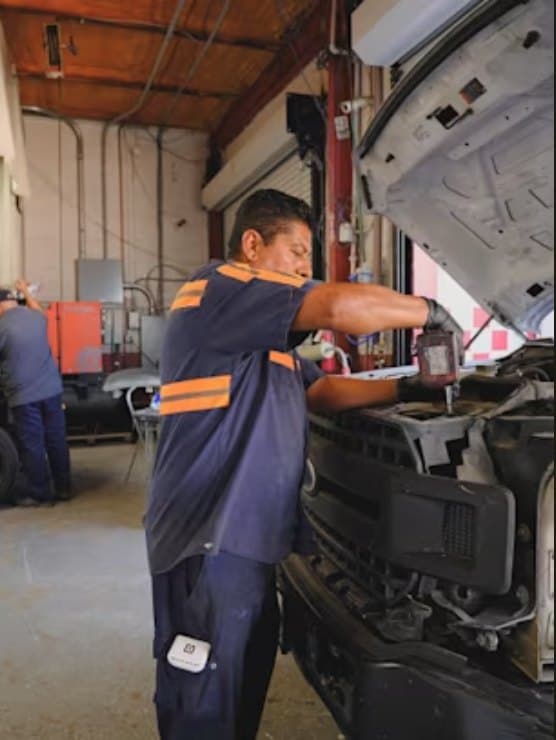 ServicesInvoices, e-Factura and team timesheets
 Production & farmingProduction orders, crops and construction
How it works
Up and running in four steps.
Create an account
Sign up in a few minutes. The first 14 days are free, with no contract.
Set up your business
Add your products, team and tills. Import your catalogue from Excel or build it from scratch with the guide at docs.posfix.md.
Choose your equipment
Use the computer, tablet or phone you already have, or a terminal with a printer.
Register and sell
We register the till with the SFS together, usually within a few working days. Then every receipt reaches the SFS at the sale and stock goes down automatically.
Compliance
In line with Moldovan tax law.
Till registered with the SFS
The POSfix apps for Windows and Android are registered by the SFS as cash and control equipment (S019, S020) and send every receipt to SIA MEV.
e-Factura Moldova
The invoice is created from the sale and uploaded to SFS e-Factura; you sign it in the portal and follow its status in POSfix.
Data protection
Encrypted connection (HTTPS), access only to your company data, our own servers in Chișinău and backups every 2 hours.
Tax returns in XML
With the accounting software, SFS returns (TVA12, IPC21, IALS14 and more) are filled from your records and downloaded as XML, ready to file.
Receipt by email or SMS
The customer gets the receipt by email or SMS, with a link to the receipt registered with the SFS; the printed receipt has a QR code for checking.
VAT by rate
Each product has its own VAT rate (20%, 8%, 0% or no VAT), and the Z report shows VAT separately for each rate.
What the till does for the SFS and what stays with you? It is all on the compliance page.
Read about compliance →Partner banks
Your bank's terminal can also be your cash register
We work with maib, MICB, Victoriabank and OTP Bank. We install the POSfix register on the terminal your bank gives you: customers pay by card and get the fiscal receipt right away, while the sale shows up in your dashboard and is posted to the accounting ledger automatically.

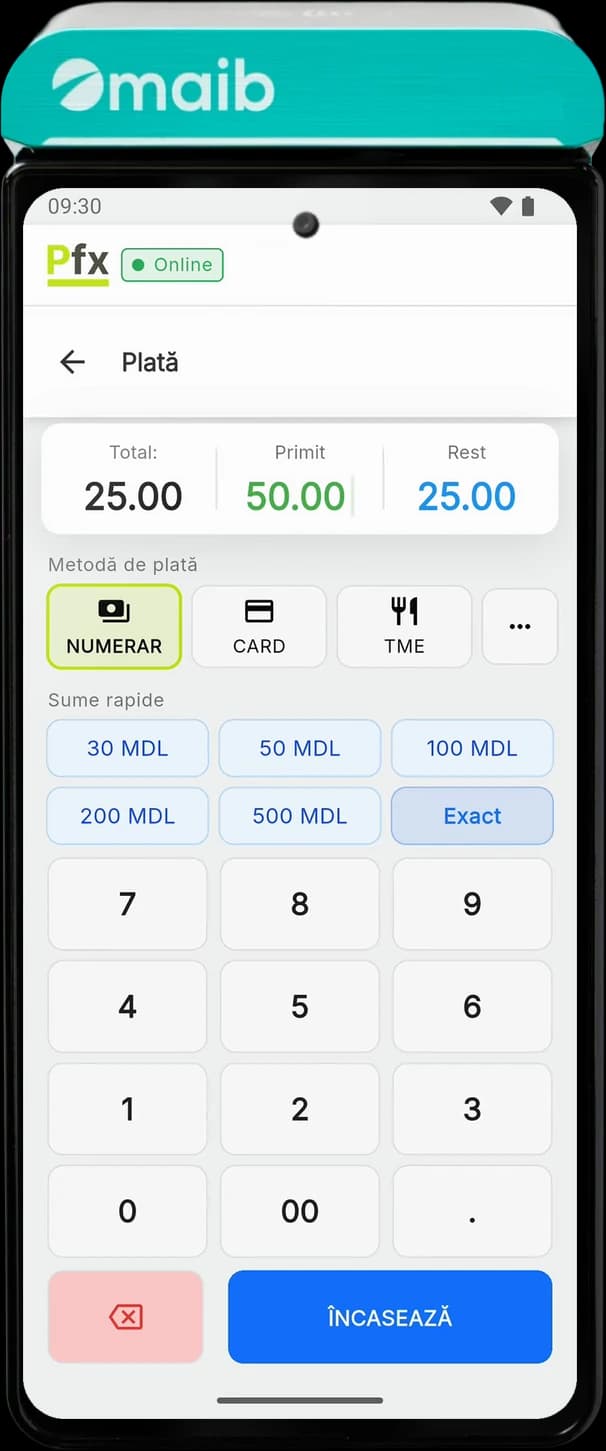
- Contactless paymentsCards, Apple Pay, Google Pay and MIA QR
- Receipt printerPrints the fiscal receipt on the spot, 70 mm per second
- 400 gramsEasy to bring to the table or the door
- 6.75-inch screenThe POSfix register across the screen, with large keys
maib · terminal with cash register
SUNMI P3
Customers pay by card, by phone or with MIA QR, and the same device prints the fiscal receipt. The money reaches your account the next business day, and every sale lands in your dashboard with stock and accounting up to date.
- Payments
- contactless cards, Apple Pay, Google Pay, MIA QR
- Funds
- in your account the next business day
Why these banks
One device instead of two
The bank's terminal stays on the counter: it takes the card and prints the fiscal receipt, with no separate cash register next to it.
Your contract is with your bank
You agree the fee and the payout account with your bank, and we take care of the cash register on the terminal.
We handle fiscal registration together
We help you register the cash register with the State Tax Service step by step, and every sale reaches your POSfix dashboard.
Extended, top-level support
The POSfix team answers in Romanian and Russian and helps with the terminal, the register and the accounting. Read what the businesses we work with say about us in the reviews.
Read the reviewsConnects with other systems
The POSfix register and accounting connect through an API with your online store, an inventory program or your own app.
Integrations portal
Equipment
Equipment for your cash register
POSfix runs on the computer or tablet you already have, on a terminal with a built-in receipt printer, or on a phone. Pick the printer, scanner, cash drawer and scale from our catalogue.
- Computer or tabletInstall the register on what you already have and connect a receipt printer, a scanner and a cash drawer.
- Terminal with printerThe register and the receipt printer in one device, at the counter or at the table. PAX, Sunmi or Senraise.
- SoftPOS: cards on your phoneThe customer taps the card on your phone or tablet, with no separate bank terminal. We set up the link with your bank under your contract.
From the catalogue:Receipt printersBarcode scannersCash drawersElectronic scalesLabel printers
Google reviews
What businesses that work with us say
„Am avut parte de o deservire foarte bună, promptă și profesionistă pentru configurarea aparatului de casă. Un mulțumesc special consultantului Dumitru, care a fost foarte amabil, răbdător și atent la toate detaliile.”
Adriana Dodon
Google review
„Sistemul este ușor de utilizat, rapid și foarte comod pentru gestionarea activității de zi cu zi. Îmi place că pot gestiona casa de marcat, plățile și documentele dintr-un singur sistem.”
Dulina Elena
Google review
„O companie foarte bună, cu servicii de calitate și personal amabil. Sistemul POSfix este ușor de utilizat, iar echipa de suport oferă ajutor rapid și explică totul clar. Recomand cu încredere!”
Vlada Mircev
Google review
„Am avut o experiență foarte bună cu POSfix. Comunicarea a fost rapidă, iar echipa a răspuns prompt la toate întrebările mele. Am primit ghidul de utilizare și tot suportul necesar pentru configurare.”
Daniela Rotari
Google review
5.0 on Google
Read all reviews →Frequently asked questions
What people who want to get started ask us most
Can't find what you're looking for? Our support team is available Monday–Friday, 9:00–18:00.
Contact support →How much does POSfix cost, and are there hidden fees?
You pay a monthly subscription made up of the modules and capacity you choose — for example, the number of receipts per month for each till. No VAT is added to the prices listed on the Pricing page; you pay only for what is in your contract.
Is POSfix registered with the State Fiscal Service?
Yes. The POSfix apps for Windows and Android are registered by the SFS as cash and control equipment (codes S019 and S020) and send every receipt to the “Electronic Sales Monitoring” information system (MEV). You don't need a fiscal printer.
Which devices does POSfix run on?
On a computer or laptop with Windows 10 (version 2004 or later) or Windows 11, on Android phones and tablets, and on PAX, Sunmi and Senraise Android terminals with a built-in printer. The receipt is printed on the terminal's printer or on a receipt printer connected by cable, network or Bluetooth, or sent to the customer by email or SMS. You don't need a fiscal printer.
How does e-Factura work in POSfix?
You create the invoice straight from the sale and POSfix uploads it to the SFS e-Factura system. You sign it in the e-Factura portal and then follow its status in POSfix; the invoice XML stays stored with the document.
How long do installation and setup take?
You create your account yourself at cp.posfix.md in a few minutes, and you add products by hand or import them from an Excel file. You install the app on your computer or download it on Android; we register the till with the SFS together, which usually takes a few working days.
Does the till work without internet?
Not for fiscal receipts: the POSfix till sends every receipt to the SFS at the moment of payment, so it needs internet (Wi-Fi, cable or mobile data). Without a connection you can search products and prepare the cart, but the receipt is issued only once the connection is back. The Z report, sending receipts by email or SMS and QR payments also need internet.
Can I manage several points of sale from one account?
Yes. In the web panel you see the sales of all your tills, with reports per till and per cashier, and products and prices reach every till automatically. Stock per warehouse and transfers between warehouses come with the stock management module.
Is there a fixed-term contract?
No. The subscription contract has no fixed term and is billed monthly. To add or drop a module or to end the subscription, write or call us and we update the contract; a month already started is billed in full.
The POSfix team helps you
Let's launch
your business on POSfix together.
The first 14 days are free, with no contract. We show you how things work, help you set up and stay by your side afterwards.