Online cash register
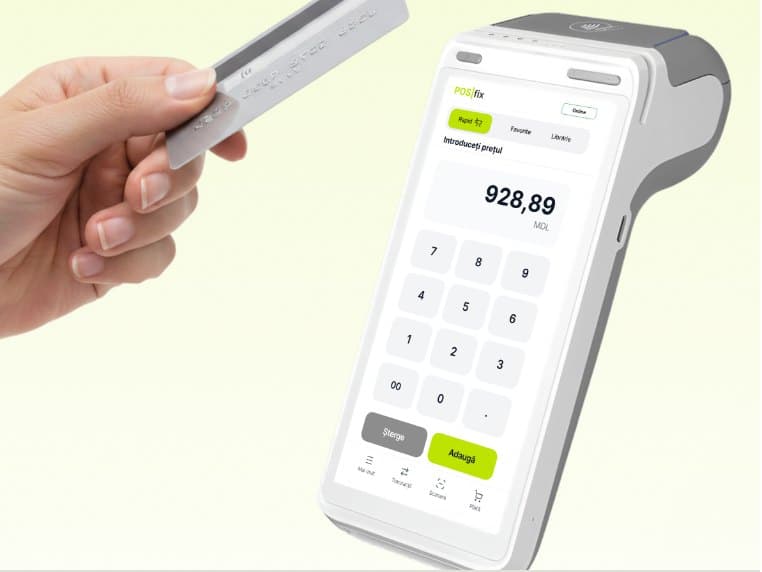
POSfix is the modern alternative to the classic cash register — a fiscal till on Windows and Android. It turns your computer or Android device into a cash register with no physical fiscal memory: every receipt goes straight to SIA MEV. All you need is a device and internet; we handle the fiscal registration.
The POSfix cash register: what it costs, what it runs on and how we register it with the SFS
What it costs
One terminal costs 69 MDL a month, with 1,500 receipts a month, 50 products and 2 cashiers included. If you sell more, the price goes up in steps, and no VAT is added to it. The first 14 days are free.
Work out the cost for your business →What it runs on
On the computer, phone or tablet you already have, or on a terminal with a receipt printer. You can pick the printer, scanner, cash drawer and scales from our catalogue.
See the equipment →How the register gets into the SFS registry
The POSfix apps are included by the SFS in the Unified Register under codes S019 and S020. We register your till together with you, step by step, usually within a few working days. After that, every receipt reaches SIA MEV at the moment of sale.
What the register does for the SFS →
What it solves
You're required by law
Where the law requires it, every sale must be recorded with cash register equipment connected to SIA MEV; without it you risk fines. The POSfix apps are certified and included by the SFS in the Unified Register under codes S019 and S020.
A classic register is one more device
A classic register is bought separately and needs its own service and supplies. POSfix runs on the computer, tablet or terminal you choose, with an ordinary receipt printer.
No grip on your sales
You keep records on paper or from memory and don't really know how much you sold. With POSfix every receipt shows up in the web panel, with reports by day, by till and by cashier.
- A fiscal receipt sent to SIA MEV with every sale, with a QR verification code
- Windows 10 or 11 computers, Android phones and tablets, PAX, Sunmi and Senraise terminals
- Cash and card through the bank's terminal; on Android also a card held to the phone or a MIA QR code
- The receipt by email or SMS, with a link to the receipt registered with the SFS
- e-Factura created from the sale and uploaded to the SFS system
- Stock, accounting, CRM and loyalty as subscription modules
- On Windows, new versions install at startup once you confirm; on Android, from Google Play
Questions
Questions about the cash register
Is an electronic cash register mandatory by law?
For most businesses that take money from customers, yes: the Tax Code requires cash and control equipment registered with the SFS and connected to the electronic sales monitoring system, and taking payments without it where it is required is fined. If you're not sure whether your activity falls under the obligation, ask us.
Is POSfix registered with the State Fiscal Service?
Yes. The POSfix apps for Windows and Android are registered by the SFS as cash and control equipment (codes S019 and S020) and send every receipt to the “Electronic Sales Monitoring” information system (MEV). You don't need a fiscal printer.
How long does connecting to the SFS take?
We fiscalise the till together: we help you at every step, and it usually takes a few working days. Once registered, the till issues receipts right away and every receipt reaches the SFS at the moment of sale.
Does the till work without internet?
Not for fiscal receipts: the POSfix till sends every receipt to the SFS at the moment of payment, so it needs internet (Wi-Fi, cable or mobile data). Without a connection you can search products and prepare the cart, but the receipt is issued only once the connection is back. The Z report, sending receipts by email or SMS and QR payments also need internet.
Can I use the equipment I already have?
In most cases, yes. The app runs on Android phones and tablets, on PAX, Sunmi and Senraise terminals and on computers with Windows 10 or 11, and the Windows till works with receipt printers, barcode scanners, electronic scales and cash drawers.
How much does POSfix cost, and are there hidden fees?
You pay a monthly subscription made up of the modules and capacity you choose — for example, the number of receipts per month for each till. No VAT is added to the prices listed on the Pricing page; you pay only for what is in your contract.
The POSfix team helps you
Let's launch
your business on POSfix together.
The first 14 days are free, with no contract. We show you how things work, help you set up and stay by your side afterwards.