
Accounting where you do not type the same thing twice.
Partners, bank accounts and VAT payer status are brought in by the program. You do not enter invoices received through e-Factura a second time, and the returns due by the 25th are filled in from your records, under SNC.
We do not ask for a card, and nothing is invoiced on its own after the trial. Soft contabil costs 350 MDL a month per company, with payroll included; e-Factura is paid for separately. The program and the team work in Romanian and in Russian.
Recorded in the demo company: a click on the balance of account 221.1 opens what can explain it, then the account card, and the number on the card opens the invoice behind the amount, with its journal entry.
350 MDL
a month, per company
11
returns with a file ready to upload to raportare.gov.md
2 clicks
and you see the document behind an amount
14 days
of trial, with no card
The things you no longer type in yourself.
Everything below happens without you pressing anything for each case. Where a button or a one-off setting is needed, its row says so.
A company that appears for the first time in a bank statement, with its fiscal code, or on an e-Factura you receive is added to your list of partners with its name and fiscal code; from an e-Factura it also comes with its address. If you already had the company, the program uses that record, so you do not end up with the same company twice. You fill in the rest of the record yourself.
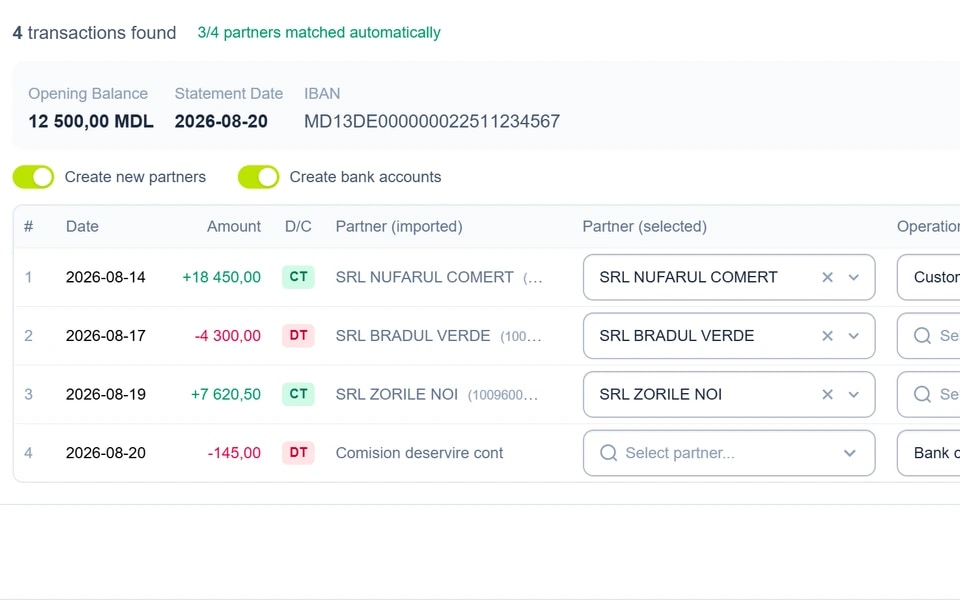
A statement import in the demo company: three of the four partners are recognised, and the “Create new partners” and “Create bank accounts” switches are on by default.
You type the first letters of the name and pick the company from the State Register: the name, fiscal code and legal address fill in on their own. For a 13-digit fiscal code, the program asks the State Tax Service (SFS) whether the company is a VAT payer and ticks “VAT Payer”, with an “SFS” mark next to it. It checks your own company’s VAT payer status every day and tells you when it changes.
Recorded in the demo company: a few letters, the company picked from the State Register, and the name, IDNO and address fill in on their own.
You do not type in your company’s bank accounts. Each time you sign in, the program reads the accounts registered with the SFS under the company’s fiscal code and adds any that are missing, with the bank’s official name; an account opened in the meantime appears the next time you sign in. When you type an IBAN yourself, the bank fills in on its own, and for foreign-currency accounts you check the currency.

If the company has an account with maib, you enter the keys you received from the bank once and turn on synchronisation for your accounts. After that, the program brings in new transactions on its own and prepares the operations it recognises, with the partner, the operation type and the account already set; what you correct once is remembered. For other banks you upload the file downloaded from internet banking. The journal entry is made when you press “Post all”.

If the company sells through POSfix tills, the Z report becomes a retail sales document on its own and is posted: revenue and VAT by rate, cash, card payments and the cost of goods sold. If something stops it, such as a closed month or a product not linked to the catalogue, the document waits for you in the “To resolve” list, with the reason written down.
The official exchange rate of the National Bank of Moldova (NBM) comes into the program every day and goes onto a foreign-currency document by itself, at the document’s date. The fiscal calendar takes the deadlines published on sfs.md every day, for the current month and the next two, and on the home page you see the upcoming deadlines with the days left.
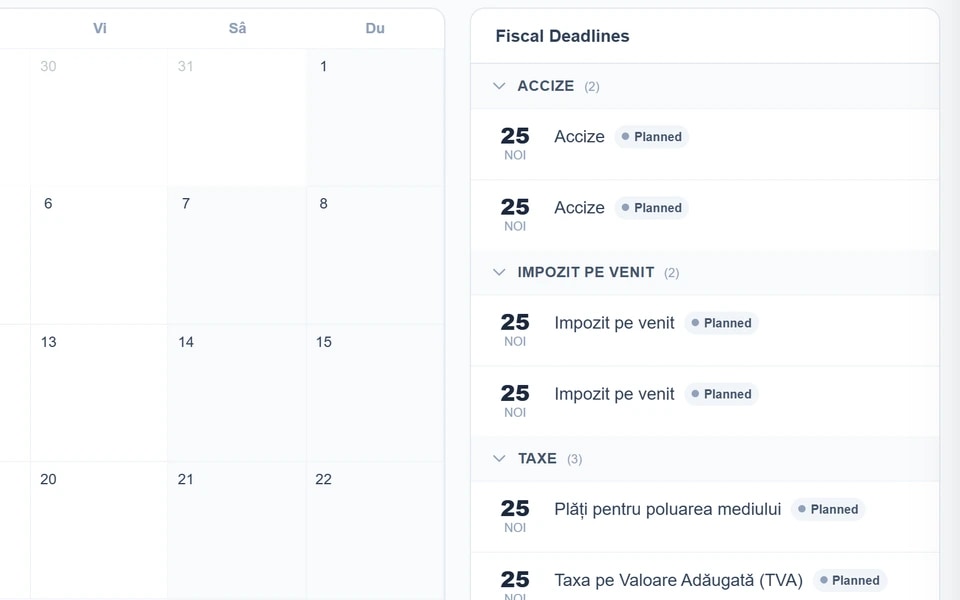
The demo company’s fiscal calendar for November 2026, with the deadlines taken from sfs.md.
You choose the month and press “Generate”: the boxes of the VAT return fill in from the sales and purchases register. Whatever has no source in your records stays empty, for you to fill in. You check it, correct what needs correcting and download the file for raportare.gov.md.
Recorded in the demo company: you choose the month, press “Generate”, and the boxes of the VAT return fill in from the register.
A statement import in the demo company: three of the four partners are recognised, and the “Create new partners” and “Create bank accounts” switches are on by default.
Journal entries, payroll and the month-end close start when you press their button. The program prepares, and the decision stays with you.
Here is what Soft contabil does in each part of your working month.
The screens below are from our demo company, SRL DEMO POSFIX, as they look in the program. Click or tap a screen to see it at full size.
Day to day
The program brings in the e-Factura invoices you receive from the SFS on its own, about once an hour. From each one you make the supplier invoice with “Generate purchase invoice”: you match the lines with the products in your catalogue and post it. Paper or PDF invoices you upload several at a time: the program reads them, and you check the lines next to the image of the invoice. Both e-Factura and invoice reading (“Invoice recognition” in the price list) are paid for separately.
Day to day
The program brings in the statement straight from the bank, where a link with the bank exists, or you upload it as a file downloaded from internet banking. The lines become draft operations, with the partner found by fiscal code, and you only correct what was not recognised. On posting, receipts and payments are settled against the partner’s invoices, starting with the oldest.
After the 10th
If the company also has e-Factura in its subscription, you see how many received e-Factura invoices do not have an accounting document yet; in the list they carry the “Not linked” mark. An invoice cancelled by the supplier shows as cancelled after the program brings the invoices in from the portal again, so you learn about it before you fill in the VAT return. The sales and purchases register shows you the month invoice by invoice, and with each partner you draw up the settlement reconciliation statement (in the program, “Reconciliation Act”).
By the 25th
TVA12 fills in from the sales and purchases register, and IPC21 from the posted payroll calculation. You check the form on screen, correct what needs correcting and download the return file with the “XML” button. You upload the file to raportare.gov.md, where you sign and send the return yourself, as before.
At the close
For depreciation and cost allocation you first see what is about to be recorded, and before you confirm the close, the list of operations that will be carried out. The month does not close while draft entries remain.
Does the company sell through POSfix tills?
You do not enter till sales: each till’s Z report becomes a retail sales document and is posted. If something stops it, such as a closed period, it stays a draft and you post it yourself.
Payroll is included
When the law changes, we update the rates and exemptions, and an old month stays on its own rates. Timesheets, leave and bonuses go into the salary calculation.
Tax depreciation sits next to accounting depreciation
Depreciation of fixed assets is calculated on two bases, the accounting one under SNC and the tax one, so you no longer work out tax depreciation separately. Commissioning, disposal and the inventory count have their own documents.
Returns fill in from your records, and the file is ready for raportare.gov.md.
The days before the 25th are the busiest of the month, so you can prepare any return in advance, on any day, with the “Generate” button.
You see the form on screen as it is printed. The program fills it in from your records wherever it has a source for the figures: the sales and purchases register, the payroll calculation, the account turnovers. Boxes your records have no figures for stay empty rather than being filled with zeros, so you can clearly see what is left for you to fill in.
When the form is ready, you press “XML” and get the return file, built from what you see on screen, with your corrections. The program first checks that the file follows the official format of the electronic return. You find out about a formatting mistake at that point, from the list of things that need fixing, not on the portal on the deadline day.
You upload the file to raportare.gov.md, which you can also reach through the taxpayer’s personal account on sfs.md, under the “Declarație electronică” service. There the return opens already filled in from the file, so you do not type the figures in once more. You sign it and send it yourself, as before.
When the amount in a box of the VAT return does not add up for you, a click on it, in the sales and purchases register, shows the lines it is made of. You do not copy the VAT left for deduction by hand: after you press “Confirm VAT carry-forward”, the amount in box 23 appears in box 19 of the next month.
11 returns have a file to upload
- TVA12 with its annexes
- IPC21
- IALS
- INR14
- IRM19
- VEN12
- SIMM
- UNIF25
- TL13
- 5-CI
- ISAPTI
- The financial statements, with the balance sheet and the profit and loss statement, on the official forms, ready to print
- Forms with text in two languages can be shown in Romanian, in Russian or in both on the same sheet
- The month’s deadlines are in the fiscal calendar, taken from sfs.md: you tick what you have filed and see what is still to be filed
- You do not work out separately what the company owes the budget: the payment order is based on each month’s liability, taken from the books
You run the month-end close, and the program stops wherever a document has something to resolve.
For depreciation and cost allocation you first see what is about to be recorded, and you confirm the list of operations yourself, at the end.
Before anything else, the closing wizard checks that the turnovers match the journal entries and shows you the entries still in draft. When you press “Close Period”, the program carries out, one at a time, the operations below that are still outstanding, in this order. If something interrupts you, leave the wizard: the month stays “Closing” until you come back.
Stock cost correction
You do not recalculate the cost of stock issues yourself: it is recalculated for the whole month, for companies that also keep their stock records in the program.
Reposting the month’s documents
If a document has something to resolve, the close stops and shows you which one.
Currency revaluation
You do not work out exchange differences by hand: foreign-currency accounts are revalued for each analytic.
Advances paid to suppliers
A debit balance left with a supplier moves to the advances paid account. In 1C the operation is called “Закрытие авансов выданных”.
Fixed asset depreciation
From each fixed asset’s schedule, on the accounting basis and on the tax basis.
Intangible asset amortisation
You can correct the month’s document while it is a draft.
Indirect cost allocation
After you have seen on screen the entries that are about to be made.
Closing the period
The month’s documents can no longer be changed, so its figures stay the ones you checked. If needed, the month is reopened by whoever also has the right to close it.
You see the month’s result at every close, at the “Financial Result” step, without anything being posted. Revenue and expense accounts build up over the whole year and are closed only once, in December, after the income tax calculation, through the balance reform.
Read the month-end close checklist in the guide →You decide the account, and every entry shows its document.
The account on the document is yours
The program suggests the account from the operation type and the accounting policy. If you change it on the document, the entry uses yours.
Two clicks show you the document behind an amount
The account code in the trial balance opens the account card, and the document number on the card opens the document the entry came from. A click on an amount shows you what explains it: the account’s trial balance by analytic, its card, the account analysis or the turnover by month.
You see a partner’s balance by contract and by document
Account 221.1, for example, is tracked by partner, contract and settlement document, and the trial balance breaks it down by each of them, with the balance split into debit and credit if you ask for it.
See who changed a document and when
The program keeps a log of actions, with the person, the date and the time (in Settings, “Audit Log”). You open it when an inspection comes or when a figure has changed and you do not know why.
When the rules change, old months keep their own
An old month that you recalculate stays on the rules of that time. When a rule in the accounting policy changes, you add a new version with an “Applies from” date, and the payroll rates each have the date they apply from.
You put a mistake right in the document
You correct it and post it again, and the entry is rebuilt. In the checks before the month-end close you see posted documents without an entry and entries left without a document, each with what needs doing.
Do you keep the books of several companies? You sign in with the same e-mail and password, and in each company you have your own permissions.
You choose the company from a list, without leaving the program and without another password. The records do not mix: each company keeps its own chart of accounts, accounting policy, periods and documents.
- So that you do not mix the companies up, each one appears in the list with its IDNO and your role in it; your permissions there depend on that role
- The client does not give you their password: the person who registered the company in the program (shown as “Owner”) invites you with the Accountant role, and the company appears in your list
- The accounting settings are in your hands: with the Accountant role you can change the chart of accounts, the entry templates and the accounting policy, and you post and unpost documents
- Each company has its own contract: Soft contabil costs 350 MDL a month per company
You can start with a single company and join the others one at a time.
Do you work at a firm that keeps the books of several companies? Talk to the team →
People in Chișinău answer you, in Romanian and in Russian.
By phone and e-mail
Call us on +373 60 100 698 or write to us at info@m-373.com, Monday–Friday, 9:00–18:00. Messages that arrive at the weekend we pick up on the first working day.
In the language you work in
The team answers you in Romanian and in Russian, and you choose the program’s language yourself: Romanian, Russian or English.
A guide written for accountants
On docs.posfix.md the accounting screens are explained step by step, with a picture of each screen. The practical guides take you through the first month, the month-end close and the year-end close.
Who makes the program
Soft contabil is made by M373 SRL, a Chișinău company registered in 2014. Our till apps, which the Z reports come from, are certified as cash and control equipment and included by the SFS in the Unified Register.
You can also find us at the office
Bd. Mircea cel Bătrân 11/6, office 102, Chișinău. Call ahead so that we can welcome you.
Your company’s data
We process data under Law no. 195/2024. What you type into the program travels encrypted between your computer and us: that is the padlock in the browser’s address bar (HTTPS). Each company sees only its own data. The servers are ours, in Chișinău, and a backup copy of the data is made every 2 hours to a separate server, also encrypted. Privacy policy →
If you learned the trade in Russian, you will find the terms you know in the program.
- Trial BalanceОборотно-сальдовая ведомость
- Account CardКарточка счета
- General LedgerГлавная книга
- PostПровести
- Opening BalancesНачальные остатки
- Reconciliation ActАкт сверки
Try Soft contabil on a month you have already closed.
You do not have to move the company’s books to form an opinion. You pick a finished month for which you already have the trial balance, run it through Soft contabil and compare the figures with yours. The program you work in now stays untouched: you do the trial separately, in Soft contabil. You start with small steps:
You can check a salary right now, without signing up
Enter in the calculator below a salary you have already calculated and compare the deductions with yours. The rates and exemptions are the ones in the salary calculation of Soft contabil.
On the first day you enter an invoice and see its entry
You sign up and enter a real supplier invoice. You see the suggested accounts on each line and in the header, and you can change them. Once you have posted it, you open its journal entry and compare it with yours, account by account.
Then you run part of the month through the program
You upload the bank statement for the chosen month and compare the turnover of account 242.1 with the receipts and payments in the statement. Or you calculate the month’s salaries and put the calculation next to yours.
At the end you compare the month’s trial balance with yours
You enter the opening balances and the month’s documents, then produce the trial balance with the “Generate” button. You put it next to yours, account by account. Where they do not match, two clicks show you the document behind the amount.
Calculate a salary you already know.
What to have to hand
- The trial balance for the chosen month, with the balances broken down by partner.
- Opening balances: you enter them from your trial balance or bring them in from 1C with the “Import from 1C” button, using a file taken out of your database with the POSfix helper program. They arrive as a draft document, which you check before posting it. Our team helps you get started.
- For the bank: the month’s statement, downloaded as a file from internet banking.
- You can work on a past month: you open the chosen month yourself, because only the current month is open when you sign up.
- Soft contabil starts with the balances on the day you switch, and 1C remains the program where you look up the earlier years.
Today
You sign up with your e-mail and phone, and you pick the company from the State Register, so you do not type in its details. Once you confirm your phone and e-mail, you go into the program, where the SNC chart of accounts is already loaded. We do not ask for a card.
During the 14 days
You have the whole program open, not just accounting: e-Factura, stock and production too. For reading paper or PDF invoices you get the first three invoices. You can always see in the program how many days you have left. If you have a question, call or write to us, Monday–Friday, 9:00–18:00.
After the 14 days
We e-mail you that the trial has ended. Nothing is invoiced on its own. If you want to carry on, we sign the subscription contract for what you chose to keep. If not, you have nothing to pay and nothing to cancel.
Does the company you work for already use POSfix? Ask the person who registered it (shown in the program as “Owner”) to invite you with the Accountant role, and you go straight into its books. If the company is not in POSfix yet, tell its administrator first: whoever registers it is listed as its “Owner”. The trial needs no card and commits the company to nothing.
Soft contabil costs 350 MDL a month per company, with payroll included.
350MDL a month, per company
No VAT is added to this price.
Try free for 14 daysDoes the company also have tills? Work out the cost on the Pricing page →Banks and payments, returns, payroll and the month-end close are included. The contract is open-ended, with no minimum term, and is invoiced monthly. If you keep the books of several companies, each one has its own contract, and you sign in to all of them with the same e-mail and password.
Added only if the company uses them
e-Factura
150 MDL a month for up to 30 invoices issued; for 100 invoices, 250 MDL; with no limit, 500 MDL. Invoices received from suppliers are not counted.
from 150 MDL
Invoice recognition
The program reads paper or PDF invoices, and you check them next to the image. The first three invoices are free.
from 1 MDL a page
People working in the program and products in the catalogue
The first 2 people who sign in to the program (in Settings, “Users”) and the first 50 products are included. For up to 5 people, 35 MDL a month is added, and for up to 500 products, 19 MDL. Employees on the payroll are not counted here.
If needed, the company can add industry solutions, for example for production, restaurants or agriculture, and POSfix tills. Their prices are on the Pricing page →
Prices are those in the POSfix price list dated 09/11/2026. The invoice shows the amount in the company’s contract.
Is it the company’s administrator or the head of the firm who decides? Send them this page: the price is per company, the contract has no minimum term, and if the company ends it, it receives an archive of its data.
Frequently asked questions
Fair questions to ask before you try
I work in 1C. Can I try it without giving 1C up?
Yes. You run the trial separately, in Soft contabil, and your program stays as it is. Our guide even recommends keeping the first month in parallel: the same documents in both programs and the trial balances compared at the end.
Can I bring my data from 1C?
Yes, you do not enter balances and partners again. From a file taken out of your 1C database with the POSfix helper program you bring the opening balances by account, the partners with their contracts, the bank accounts, the fixed assets and the intangible assets; missing products and employees can be created at the same time. In the program the button is called “Import from 1C”. The balances arrive as a draft document: you check it against your trial balance and only then post it.
Who files the returns?
You do, with the electronic signature you already use. Soft contabil fills in the form from your records and gives you the return file, checked against the official format of the electronic return. You upload the file on raportare.gov.md, the single window for electronic reporting, which you can also reach from the taxpayer’s personal account on sfs.md (the “Declarație electronică” service); there you sign and send the return. Statistical reports for the National Bureau of Statistics are filed on raportare.gov.md as well.
How do I work, and what do I pay, if I keep the books of several companies?
You sign in with the same e-mail and password and choose the company from a list, where each one appears with its IDNO and your role in it. Each company has its own contract: Soft contabil costs 350 MDL a month per company.
The company I work for already uses the POSfix till. How do I get in?
The person who registered the company in POSfix (shown as “Owner” in the program) invites you with the Accountant role. From the day the company has Soft contabil, you do not enter till sales: every Z report becomes a retail sales document and is posted. You do not type in earlier Z reports either: you bring them in with “Import Z-report” for the period you choose, as drafts, one per till and per day, and post them yourself.
What is different from the way I work now?
Three things, so that they do not surprise you. You do not keep document numbers in order yourself: the program gives the number on saving, with no letters in front, and starts again from 1 every year. The journal entry of a document is corrected from the document: you correct it, post it again and the entry is rebuilt. And you look for a document by what you do with it: supplier invoices are under Purchases, payment orders under Money, payroll under Team.
Is there a fixed-term contract?
No. The subscription contract has no fixed term and is billed monthly. To add or drop a module or to end the subscription, write or call us and we update the contract; a month already started is billed in full.

Soft contabil
Take a month you have already closed
and compare our trial balance with yours.
The first 14 days are free and need no card. The program you work in now stays untouched, and our team in Chișinău helps you get started, Monday–Friday, 9:00–18:00. Are you the company’s administrator? Send this page to your accountant.