Non-profit accounting
Project and grant accounting for non-profits
On every payment from a grant you pick the project and the budget line. POSfix books the expense to its line, records the funding income in the same journal entry and shows in the project list how much came from the donor and how much was spent.

Features
Records for every funded project
Donor, contract, currency, period and the line-item budget, exactly as in the funding agreement.

Each tranche with its amount in the project currency and the date it is expected. What reached the account shows from bank receipts on the funding account.

On the bank payment, payment order, cash disbursement, advance report and supplier invoice you pick the project, tranche and budget line.

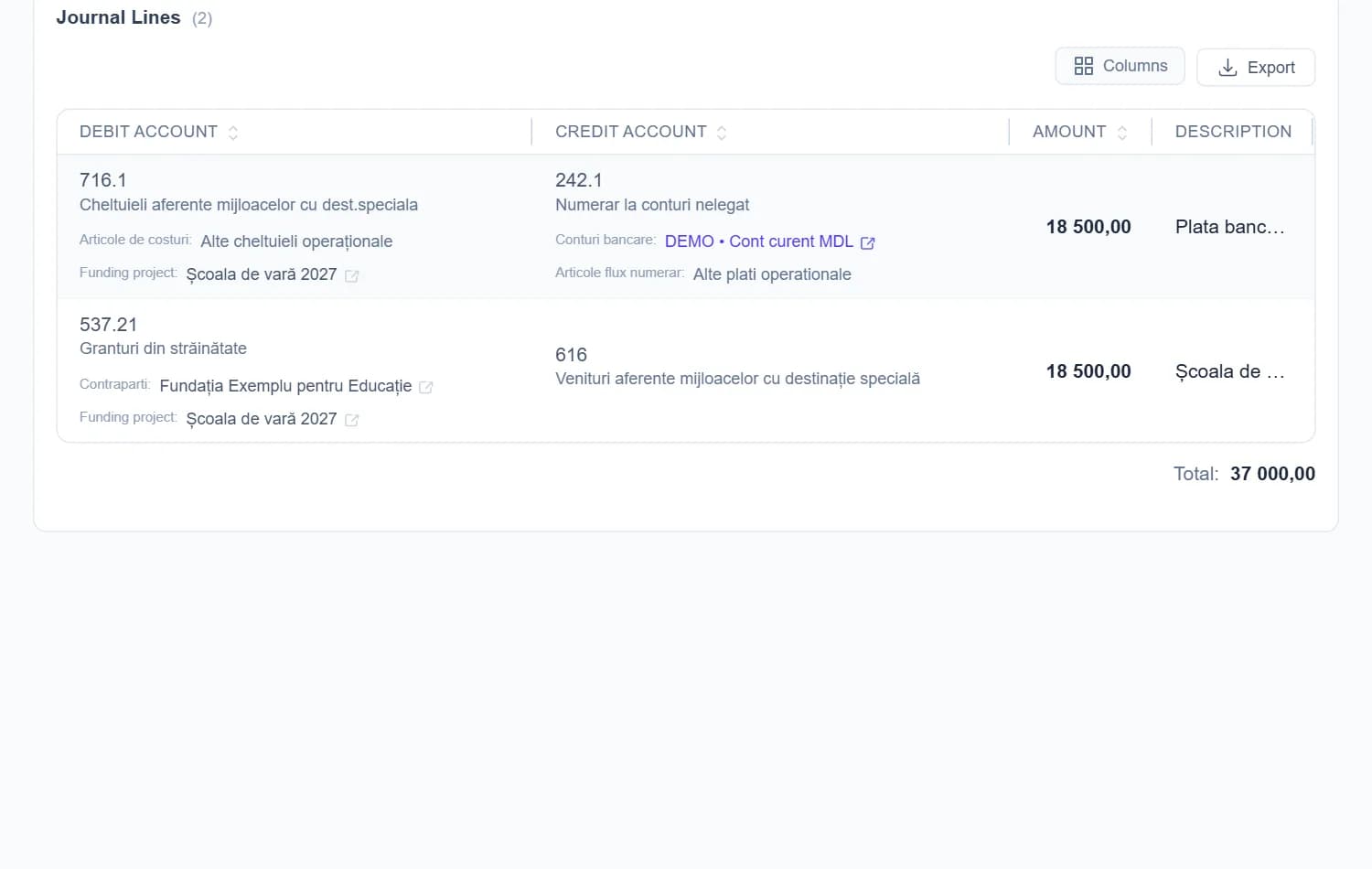
An expense on the project account brings Dt 537 – Ct 616 into the same entry, for the same amount, with the donor as analytic. Cancelling or reposting redoes it.

The project list shows the budget, the receipts from the donor and the grant spending in lei, taken from the journal entries.

The amount received through the percentage designation is kept as a project with its own source type and the same records.

Journal entry
The entry of a grant payment
The accountant pays the trainers' fee from the bank, on the “Training” budget line. POSfix writes two lines, and both carry the project with a link to its card.
- The expense on the project account (716)
- Funding income: Dt 537 – Ct 616, same amount
- The donor as analytic on account 537
- Cancelling or reposting the payment redoes the income too
Frequently asked questions
What non-profit accountants ask
How do I record a grant in POSfix?
In Accounting → Funded projects you open a new project: pick the donor from your partners, the currency, the period, the funding account (usually 537.21 for grants from abroad) and the budget lines with the approved amounts. You add tranches as they arrive, with the date and exchange rate of receipt.
What happens in the books when I pay from a grant?
On the payment you pick the project and the budget line. The expense goes to the project account (716), and in the same entry POSfix adds the funding income: Dt 537 – Ct 616, for the same amount, with the donor as analytic. If you cancel or repost the payment, the income is redone with it.
Can I keep a project in euros or dollars?
Yes. The budget and tranches are kept in the project currency, and receipts and spending show in lei in the project list.
Where do I see how much of the grant came in and was spent?
The “Funded projects” list shows, for each project, the budget, how much came from the donor (bank receipts on the funding account) and how much of the funding was spent. From the project card you open the budget lines and tranches.
How much does the non-profit module cost?
The first 30 days are free. After that the module costs 300 lei a month and is added to POSfix accounting.
The POSfix team helps you
Let's launch
your business on POSfix together.
The first 14 days are free, with no contract. We show you how things work, help you set up and stay by your side afterwards.